Magazine billing and subscription payments software
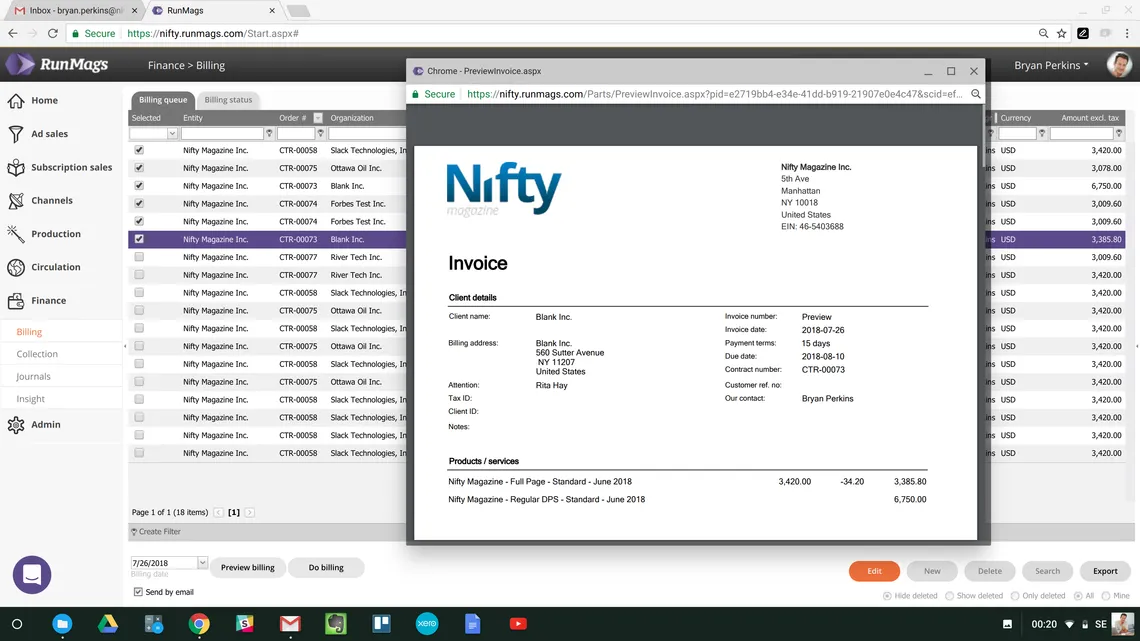
Publisher billing software turns what you sold into correct invoices and shows what has been paid: advertiser invoices from ad contracts, subscription charges and renewals, credit notes and overdue payments. RunMags does this for magazine and media publishers in the same system as advertising sales and subscriptions, so contract and subscriber data is never typed in twice. The product information, pricing and terms in your advertising contracts are seamlessly pulled into the invoice so all you have to do is to approve it before it is emailed to your clients.
With all customer and contract data in one place, RunMags contains the tools for ensuring accurate billing as the fulfillment process is completed, so customer data is never retyped. Customers, advertiser invoices and credit notes sync to Fortnox, QuickBooks or Xero per legal entity; subscription invoices are not part of that sync.
What billing covers for a magazine or media business
A publisher bills two kinds of customer: advertisers who book space across issues, and readers who pay for subscriptions. Billing software for a magazine has to handle both:
- Advertiser invoices from contracts. Each ad sold on a contract is invoiced at the price, discount and terms agreed in the contract, on signing, per issue or in instalments, as you choose per contract.
- Subscription charges and renewals. Each subscription order gets its invoice. Readers who subscribe online pay by card, and renewals are charged when your team runs the renewal batch.
- Credit notes. When an ad is cancelled or a subscription changes, a credit note corrects the invoice instead of editing it.
- Payment status. Which invoices are paid, which are open and which are overdue.
- Collection. Following up overdue invoices with reminder letters and a record of what was agreed with the customer.
- Accounting. Getting invoices into your accounting system, with the right VAT, without typing them in again.
In RunMags, subscription billing and advertiser billing run from one system and one set of customer records: subscription orders, renewal charges and ad invoices sit on the same customer records, so each customer's subscription and advertising invoices are in one place. The accounting sync to Fortnox, QuickBooks or Xero covers advertiser invoices; subscription invoices stay in RunMags and are not synced. See how the subscription renewal batch works. Comparing a subscription billing or fulfilment platform instead? See RunMags versus Pelcro for recurring billing or RunMags compared with ePublishing Multipub. Weighing an enterprise billing and collections platform? See RunMags compared with Zuora.
The advertiser invoice workflow from contract to payment
For advertising, publisher billing software has to carry one booking from the signed contract to a paid invoice without anyone retyping it. This is the path in RunMags and where each step happens; the last paragraph lists what stays outside RunMags.
- Sign the booking. The advertiser signs the booking order in the advertiser portal. The contract holds the issues booked, the price, any discount and the terms, and each ad is an order row on it. See contract management and fulfilment.
- Choose when to invoice. For each contract you choose whether to invoice on signing, per issue or in instalments.
- Create the invoices. In Finance > Billing > Billing queue you create invoices in batches. RunMags invoices the booked issues up to the billing date you choose, at the price, discount and terms on the contract, and each invoice row keeps its issue reference.
- Approve and send. The contract's product information, price and terms are pulled into the invoice, so your team approves it before it is emailed to the client.
- Correct with a credit note. If an ad is cancelled or runs wrongly, a credit note that refers to the original invoice corrects it; the invoice itself is not edited.
- Register the payment. The advertiser pays the invoice you sent, and finance registers each payment against that invoice under Finance > Collection.
- Follow up what is overdue. Finance sees overdue invoices per organisation under Finance > Collection and sends reminder letters from there when your team decides to. Activities on the customer tell the sales rep what was agreed.
- Send it to accounting. Customers, advertiser invoices and credit notes sync to Fortnox, QuickBooks or Xero per legal entity. Subscription invoices are not part of that sync. See how to invoice advertisers and sync to accounting.
What stays outside RunMags. RunMags records payments against invoices. It does not match bank files or Stripe payouts, reconcile your accounts or recognise revenue, so those stay in your accounting system. There is no ACH or SEPA direct debit, no dispute handling, credit hold or late fees, and no queue for retrying failed accounting transfers. If one of these is your main requirement, check it in any billing tool you compare.
Before the first invoice goes out, the guide A Guide to Advertiser Invoicing and Disputes lists the inputs to confirm before the billing trigger occurs and why each invoice needs a clear owner. To try the arithmetic by hand, use the free advertising invoice template.
A billing process that is a breeze
As each advertising contract in RunMags is structured data with inventory sold, timing of placement, pricing, contacts and other important information, the billing process becomes a breeze. You can trust that each ad sold also will be billed the way you chose for its contract. Once your organization is trained on how to enter information into the system from sales through production, you can automate the system to print out all invoices at the click of a button.
Worked example: billing a quarterly magazine
Example only: the title, prices and counts below are invented to show the workflow. They are not RunMags prices or customer figures.
A quarterly trade magazine publishes four issues a year. An advertiser signs a contract for a half page in all four issues at 1,200 per issue, so the contract is worth 4,800 before VAT. The same magazine has 400 annual print subscribers paying 40 a year.
- Contract to invoices. The contract has an order row for each placement. When issue 1 is published, you invoice the ad that ran in it: 1,200 plus VAT. The same happens for issues 2, 3 and 4, so the advertiser gets four invoices that match what they saw in print.
- A credit note. In issue 2 the ad runs on the wrong page and you agree a 300 reduction. You issue a credit note against the issue 2 invoice, and the contract is billed at 4,500 in total.
- Subscription renewals. After issue 3, 120 subscriptions have one issue left. Your team selects them by issues left and sends renewal reminders by email or print. When your team runs the renewal batch, auto-renewing subscriptions are charged to the subscriber's saved card at that point; each renewal order gets its invoice.
- Collection. Thirty days later, the issue 1 advertiser invoice is still unpaid. Finance sees it under Finance > Collection, sends a reminder letter from there and logs an activity so the sales rep knows before their next call.
- Accounting. The four advertiser invoices, their credit note and the advertiser's customer record sync to Fortnox, QuickBooks or Xero for that legal entity. The subscription invoices stay in RunMags; they are not part of the accounting sync.
To try the advertiser side by hand first, use the free advertising invoice template, which works out discount, agency commission and VAT.
Publisher billing software buyer checklist
Before choosing billing software for a magazine or media business, check each option against these questions with your own data:
- Contracts to invoices. Does an invoice come from the booked ad and its contract terms, or does someone retype it?
- Per-issue billing. Can a multi-issue contract be invoiced issue by issue as each one is published?
- Credit notes. Are corrections made with credit notes that refer to the original invoice?
- Subscriptions and advertisers together. Are subscription invoices and advertiser invoices in the same system as the customer record?
- Renewal charging. Are renewals charged on a schedule or when your team runs a renewal batch, and what happens when a card payment fails?
- Accounting sync. Which invoice types sync to your accounting system, per legal entity and with VAT, and which stay behind?
- Collection. Can finance and sales both see overdue invoices and what was agreed with the customer?

Collections simplified
Since the invoicing process is automated and performed in RunMags, as opposed to a separate accounting system, Finance is not restricted to work in isolation. In RunMags, Finance sees overdue invoices per organization under Finance > Collection, sends reminder letters from there, and has access to customer contact data for follow up and resolution. And like all other employees, Finance reps can add activities in RunMags to let colleagues know if an agreement with the customer was reached.
Delinquent payers can also be approached by the sales rep as part of the ongoing relationship for issue resolution. Sales reps can manage their accounts in RunMags and if they note that one of their customers is overdue, they can use it as an opportunity to strengthen the relationship and naturally get into a discussion about the next project.
Credit card payment processing
You can set up a free Stripe account to let subscribers pay for their subscriptions by card.
For advertisers, the commercial process stays in one system: the client signs the booking order in the advertiser portal, you invoice from the billing queue, and payments are registered against the invoice under Finance > Collection. Our help guide explains how to invoice advertisers and sync invoices to accounting.

Billing connected to subscriptions, circulation and sales
Billing is the last step of work that starts elsewhere in RunMags. Subscription orders, signup portals and renewals are covered on magazine subscription management, and subscriber records and print distribution lists on magazine circulation management software. To see how renewal rates change your subscription revenue over a year, try the free subscription renewal calculator.
Plans are priced by the number of legal entities and magazine brands; see RunMags pricing or start a free trial (14 days, no credit card required) and set up your first contract and subscription products.
Review the information behind each publisher invoice
Accurate billing begins before an invoice is created. Check the customer, billing contact, agreed products, prices and relevant legal entity. For advertising, connect the invoice discussion with the signed agreement and the promised delivery. For subscriptions, review the offer and renewal arrangement. The finance team should not have to reconstruct those details from an informal handover.
RunMags supports publishing billing and payment workflows, with Stripe and accounting options including the QuickBooks Online integration, Xero accounting integration and Fortnox accounting integration. Confirm the setup and scope for your chosen services. During a trial, review a representative sale, the billing handover and an exception such as a changed order or a payment that needs reconciliation. See accounting connections and Stripe payments for the next discussion.