
HELP
How to sell a subscription in RunMags
Sell a subscription yourself when a reader phones, writes or visits. You register the subscriber, record the sale as a sales order, and RunMags keeps the subscription and its payment together.
The same steps cover a gift subscription. The person who pays is one subscriber, the person who reads is another, and you link them in one field on the subscription.
Checked against the product on
Before you start
- You need Subscription sales in the left-hand menu. If you cannot see it, ask your RunMags administrator.
- The magazine, its issues and its subscription products must exist. See How to set up products and prices.
- For a gift, register the reader as a subscriber first, then the payer.
Steps
- In the left-hand menu, open Subscription sales > Subscribers.
- Check whether the person is already a subscriber: click Search under the subscriber card, type a surname or a subscriber ID, and click Search in the Find subscriber window. Select the right row and click View details.If the person is not there, close the window, click New under the subscriber card, enter the name, email and billing address, and save.
- On the subscriber, open the Sales orders tab and click New at the bottom right. Set the Order date, and a Source or Campaign if you track them.
- In the order, on the Subscription products tab, click New.
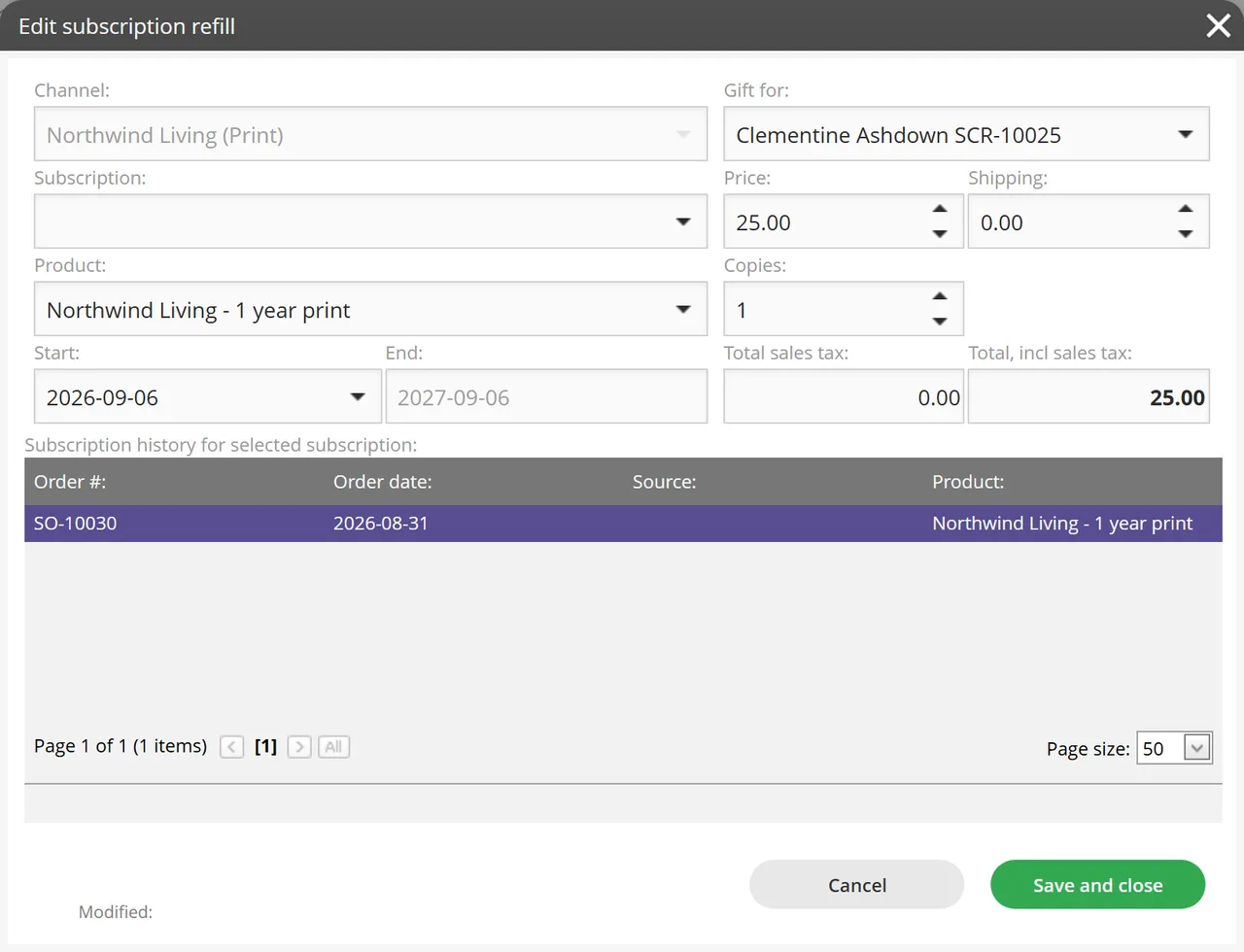
- Choose the Product, and check Price, Shipping, Copies and Start.Leave Subscription empty to start a new subscription, or choose an existing one to add issues to it.
- For a gift, choose the reader under Gift for. Leave it at [ Not set ] when the buyer also reads. Click Save and close.
- Back in the order, choose the payment method and click Complete order.

What you see
- After Save and close, the order lists one line per subscription, with Subscr. #, Subscriber, Status, Product / plan, Price, Copies and Total. For a gift, Subscriber shows the reader, not the payer.
- The order shows Total value, Sales tax and Total, incl. tax.
- In Find subscriber, the reader counts the subscription under #Own, and the payer counts the order under # Orders and #Others.
Good to know
- A subscriber is a person. A subscription is what they hold. One subscriber can have several subscriptions.
- End is filled in for you from the product’s length.
- With Pay by invoice, no payment is recorded when you click Complete order. If you choose a card stored on the subscriber, the card is charged. Any other payment type records a payment for the amount outstanding.
What it does not do
- You cannot type a card number on this form. You choose from the payment methods stored on the subscriber (the Payment methods tab).
- Each line in the order is one subscription or refill.
- It is not how readers sign themselves up. They use the subscriber portal.
If something goes wrong
- Complete order says Error: No payment method selected! Choose a payment method in the order and click Complete order again.
- A tab says Nothing here yet! The subscriber has nothing on that tab yet. Click New at the bottom right to add it.
Learn more
Read the product page: Subscription sales. Or go back to all RunMags help.