
Magazine subscription management software: what it must do, and how RunMags does it
Magazine subscription management software has to run seven jobs for every issue: renewals, payments, print and digital terms, gifts, address changes, the mailing list and the numbers behind them. Below is what each job needs, how RunMags does it, what it costs and who should choose something else.
Monthly plans are billed in arrears and can be cancelled at any time; yearly plans are billed in advance. See current prices and terms.
14-day free trial · No credit card required · Subscriptions-only plans from €149/month excl. VAT · Unlimited subscribers
“There is no way a single person could operate a business of my size without it!” Scarlett Redenius, Publisher, Florida Country Magazine: read the case study
Updated
What magazine subscription management software has to do
Use these seven jobs as your checklist for any system you compare. For each one: what a publisher needs, what RunMags does today, and where it stops.
- 01
Renewals
You need: Find who is running out, remind them in time, and turn a yes into a paid, invoiced new term.
In RunMags: Reminder rules pick subscriptions by days to expiry or issues left, send email or printed notices and cap how many go out. A renewal link opens the reader’s subscription on your subscription page. When your team runs the renewal batch, auto-renewing subscriptions are charged to the saved card and each renewal order gets its invoice.
Not yet or not included: Your team starts each round. RunMags does not yet schedule renewals or retry failed card payments.
See renewal software for publishers - 02
Payments and invoices
You need: Card payments that land in your own account, invoices for readers who pay later, and a clear record of what each subscriber has paid.
In RunMags: Readers pay by card through your own connected Stripe account. Service reps can also take an order on invoice. Each subscription order gets its invoice, with credit notes when something changes, and payments show on the subscriber’s Payments tab.
Not yet or not included: The accounting sync covers advertiser invoices; subscription invoices are not synced to accounting software yet.
See billing and payments - 03
Print and digital
You need: Print, digital and bundle subscriptions on terms of issues or months, without keeping two subscriber lists.
In RunMags: Every subscription product has a length in issues, such as six, or in time, such as twelve months, and print or online delivery. A bundle creates a print and a digital subscription on the same subscriber record, and each order records the first and last issue.
Not yet or not included: A digital subscription carries an access level, but RunMags does not lock articles on your website. It is not a paywall.
See subscription sales in RunMags - 04
Gift subscriptions
You need: The payer and the reader kept apart, so one gets the invoice and the other gets the magazine.
In RunMags: A gift subscription keeps the payer and the recipient as separate subscribers: the order sits on the payer and Gift for holds the reader. Turn on gift options on a subscription page and readers can buy gifts online.
How to sell a subscription - 05
Address changes
You need: Moves, holiday addresses and separate delivery addresses recorded before the next mailing.
In RunMags: Readers update their details, address and newsletter choices from a personal link, and your service team can make the same changes in RunMags. A subscriber can keep a temporary address with an end date and a separate ship-to address.
Not yet or not included: RunMags has no documented postal address verification, NCOA or presort service.
See the subscriber portal - 06
Fulfilment lists
You need: A correct mailing list for every issue, for the printer or mail house, with free and advertiser copies under control.
In RunMags: Choose the issue and the subscription products, check the estimated number of copies, then generate the batch from active subscriptions. One tick leaves free subscriptions out, distribution rules make a separate batch of advertiser copies, and each batch exports to Excel.
Not yet or not included: Printing, labels and posting stay with your printer or mail house.
See circulation and fulfilment - 07
Reporting
You need: How many copies went out for each issue, who renewed and who lapsed.
In RunMags: The export list keeps one row per batch with the issue, who made it and the number of copies, so you can follow your print run issue by issue. The churn and retention report follows renewals and losses.
Not yet or not included: RunMags does not produce circulation audit-bureau reports.
How to make the print mailing list
Four screens from one subscription’s life
A reader signs up on your page, a gift is recorded with its payer, and the issue’s mailing list is made and kept. These are the screens your team and your readers use.
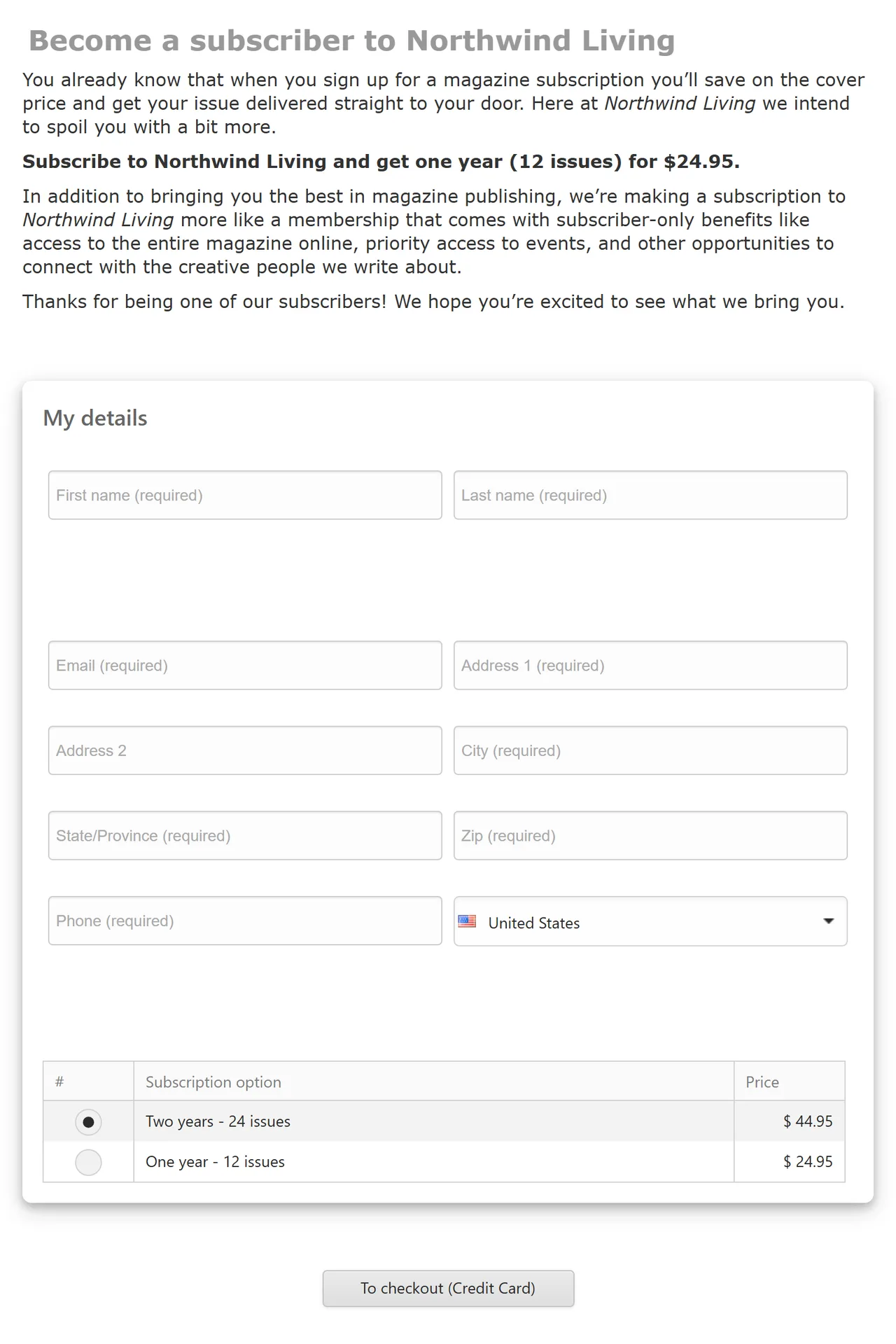
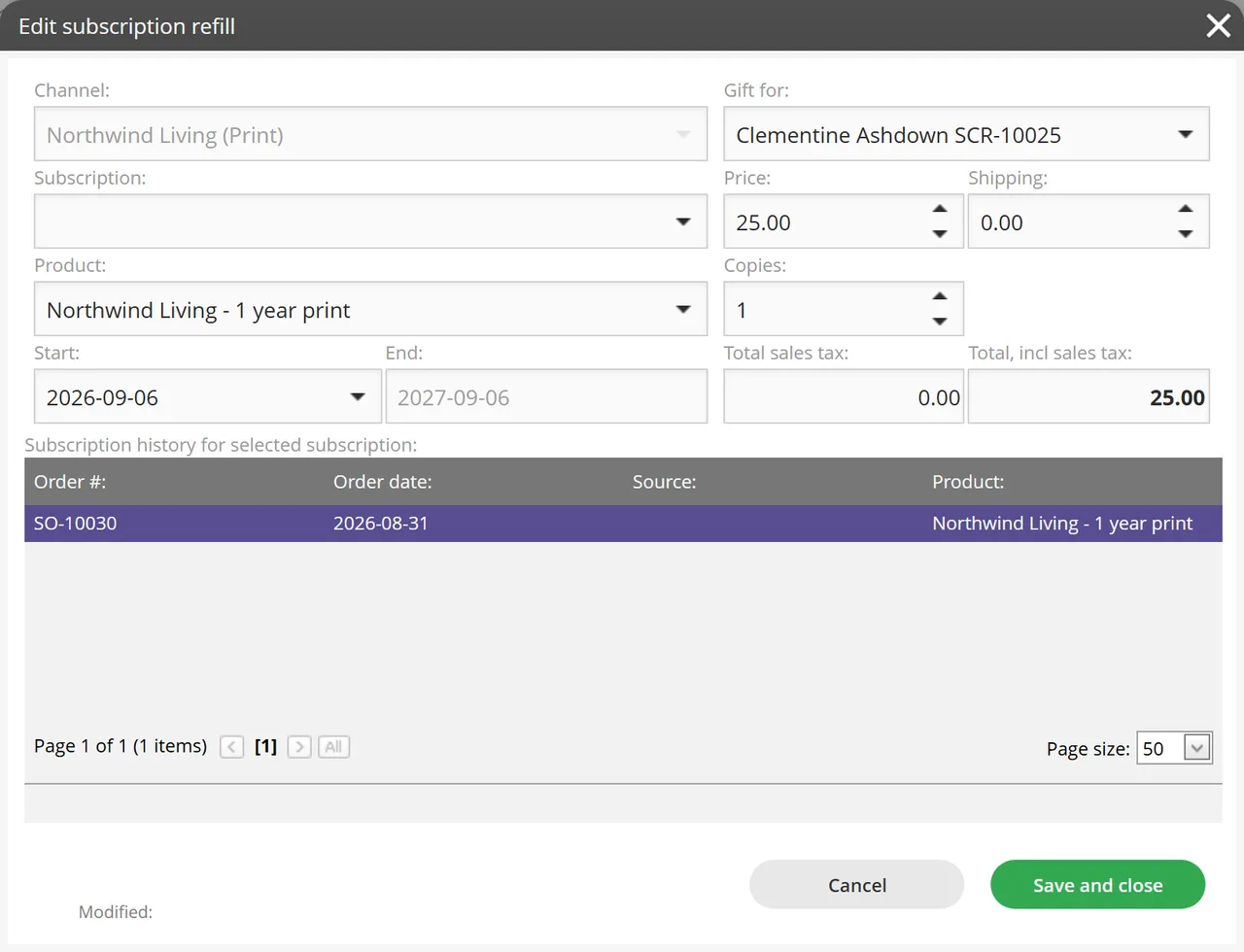
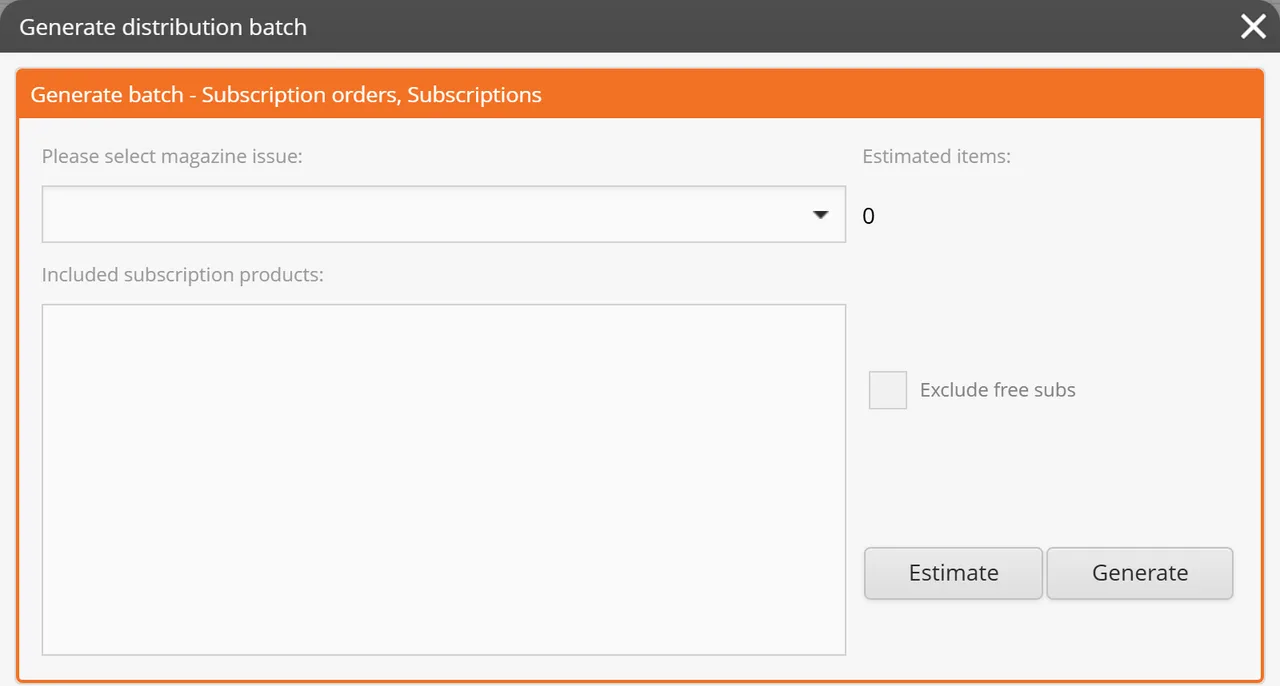
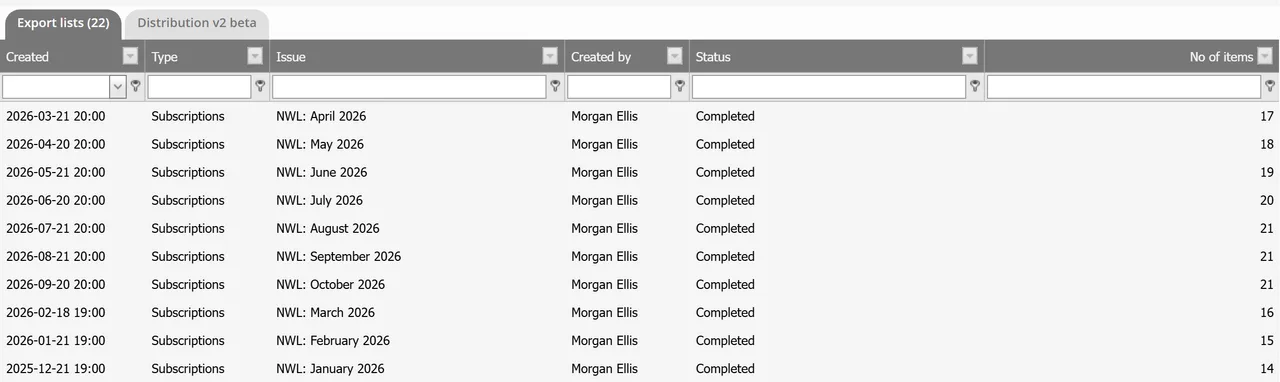
Screenshots from the RunMags demo environment, November 2026. Northwind Living and the people shown are fictional, and your account can look different as releases roll out.
Priced by titles and companies, not by subscribers
Subscriptions-only plans are sized by the legal entities and brands you publish under. Every plan has unlimited users and unlimited subscribers, so the price does not rise as your list grows.
| Plan | Covers | Price per month |
|---|---|---|
| Pro | 1 legal entity, 1 brand | €149 |
| Team | 1 legal entity, 5 brands | €349 |
| Publisher | 2 legal entities, 10 brands | €549 |
| Enterprise | Unlimited legal entities and brands | From €999 |
- Visitors in the United States pay the same numbers in US dollars, plus applicable taxes.
- Four onboarding hours are included; extra help is EUR 125 per hour.
- Card processing fees are charged by Stripe on your own account.
- The plans include the subscriber portal, renewal series, distribution lists, newsletters to subscribers, subscription invoicing and Maggie, the built-in assistant. They do not include advertising sales, the flatplan or advertiser billing.
See the subscriptions-only plans and what they include. Also sell advertising? See the full RunMags plans, which add ad sales, the flatplan and advertiser billing.
Who RunMags is for
- Publishers that sell print and digital subscriptions directly to readers, for one title or several.
- Small circulation teams that want orders, renewals, payments and mailing lists in one place rather than in spreadsheets.
- Publishers that also sell advertising and want subscribers and advertisers on the same customer records, in the CRM for magazines.
Who it is not for, today
If one of these is a must-have, RunMags is the wrong choice for now. We would rather you know before a trial.
- You need a paywall that locks articles on your website for paying subscribers.
- You renew many card subscriptions every month and need renewals charged on a schedule, with automatic retries of failed cards.
- Readers must manage everything themselves: change their card, download invoices or cancel online. Today your team does these for them.
- You need postal address verification, presort or audit-bureau reports from the subscription system itself.
- Subscription invoices must sync to your accounting software.
Specialist reader-revenue and circulation platforms cover some of these. Our RunMags vs Pelcro comparison and SimpleCirc alternative guide show where each fits.
Test any subscription system with one issue
Run the same short script in every trial or demo, with your own products and a few test subscribers.
- Sell a six-issue print subscription and a twelve-month digital one, and check the first and last issue on each.
- Sell a gift, and check who gets the invoice and who gets the magazine.
- Change a reader’s address, and find the new address on the next issue’s list.
- Run one renewal round from reminder to payment and invoice, and ask what happens when a card is declined.
- Make the next issue’s mailing list, and compare the count with your current list.
- Ask what the system will cost when your list is twice its size.
The RunMags help centre shows the steps in RunMags for selling a subscription, sending renewal reminders and making the print mailing list.
Questions about magazine subscription software
What is magazine subscription management software?
It is the system a publisher uses to sell and keep subscriptions: subscriber records, print and digital subscription products, orders and payments, renewal reminders, address changes and the mailing list for every issue. Magazine subscription software differs from general subscription billing because terms often run for a number of issues, not only months, and every issue needs a correct list for the printer or mail house.
Can RunMags handle print and digital subscribers together?
Yes. Print, digital and print plus digital bundle subscriptions are subscription products on the same subscriber record, on issue-based or time-based terms. RunMags does not lock articles on your website, so it is not a paywall.
How are address changes handled?
Readers update their details and address from a personal link, and your service team can make the same change in RunMags. A subscriber can also keep a temporary address with an end date and a separate ship-to address.
Does RunMags verify postal addresses or produce circulation audit reports?
No. RunMags has no documented postal address verification, NCOA or presort service, and it does not produce audit-bureau reports. It builds the distribution list and exports it to Excel; your printer, mail house or audit provider does those steps.
Are renewals automatic?
Partly. Reminder rules choose who is due, and when your team runs the renewal batch, auto-renewing subscriptions are charged to the saved card and each renewal gets its invoice. Your team starts each reminder round and each batch: RunMags does not yet schedule renewals on its own or retry failed card payments.
Does RunMags include a paywall?
No. A digital subscription carries an access level on its product, but RunMags does not control access to articles on your website today. If paid website access is a must-have now, use a paywall specialist.
How much does magazine subscription software cost with RunMags?
The subscriptions-only plans cost Pro EUR 149, Team EUR 349, Publisher EUR 549 and Enterprise EUR 999 per month, excluding VAT. Pro covers one legal entity and one brand. Every plan has unlimited users and unlimited subscribers, so the price does not rise as your list grows. RunMags prices use the same numbers in euros and US dollars, with no currency conversion: visitors in the United States see US dollars, plus applicable taxes; everyone else sees euros, excluding VAT. Card processing fees are charged by Stripe on your own account.
Can we move our existing subscribers into RunMags?
Yes, with help. RunMags offers import assistance for existing subscribers. Map titles, terms, issues remaining, payers and recipients first, and test a sample before you switch. Saved cards held by another provider are not guaranteed to move, so plan that with your payment providers. Four onboarding hours are included; extra help is EUR 125 per hour.
Is there a free trial?
Yes. Every plan starts with a 14-day free trial without a credit card.
Try it with your next issue.
Start a 14-day free trial without a credit card, set up one subscription product and make a test mailing list.
Monthly plans are billed in arrears and can be cancelled at any time; yearly plans are billed in advance. See current prices and terms.
Prefer to see it first? Book a demo.